7 websites to compare and shortlist secondary schools after PSLE
PSLE results come out on Tuesday, and you’ll have 7 days to put 6 secondary schools in order. Plenty of websites now promise to help with that.
We tried 7 of them with exactly the same test, so you can see how each one looks before you commit an evening to it.
A quick disclosure first. One of the 7 is ours, and it’s first on the list. We’re biased, obviously. We also think our compare page is the cleanest way to see 6 choices against one score, so we’ve put it first and shown the same screenshot test for everyone else. Judge for yourself.
The test
Every site got an AL 12 score and the same 6 schools, including one stretch (Anderson, last year’s cut-off 11).
| Site | Compares | Your score | Score vs cut-off | Saves list |
|---|---|---|---|---|
| SG Schooling | 6 | AL total | Shared scale | Device |
| alscore.sg | 6 | 4 grades | 4 bands | Device + link |
| School Matters SG | 3 | None | None | Device + link |
| MOE SchoolFinder | No limit | Range filter | None | Device |
| SLC AL Finder | 6 | AL total | In words | No |
| SchLah | None | AL total | Sorted list | No |
| SchoolAdvisor SG | 4 | AL + postal code | None | Link |
1. SG Schooling
Compare schools is built for one job: checking your six choices against one score.
Type the AL score, pick the posting group, then add schools by name or area. You can also add them straight from our secondary cut-off point table while you browse.
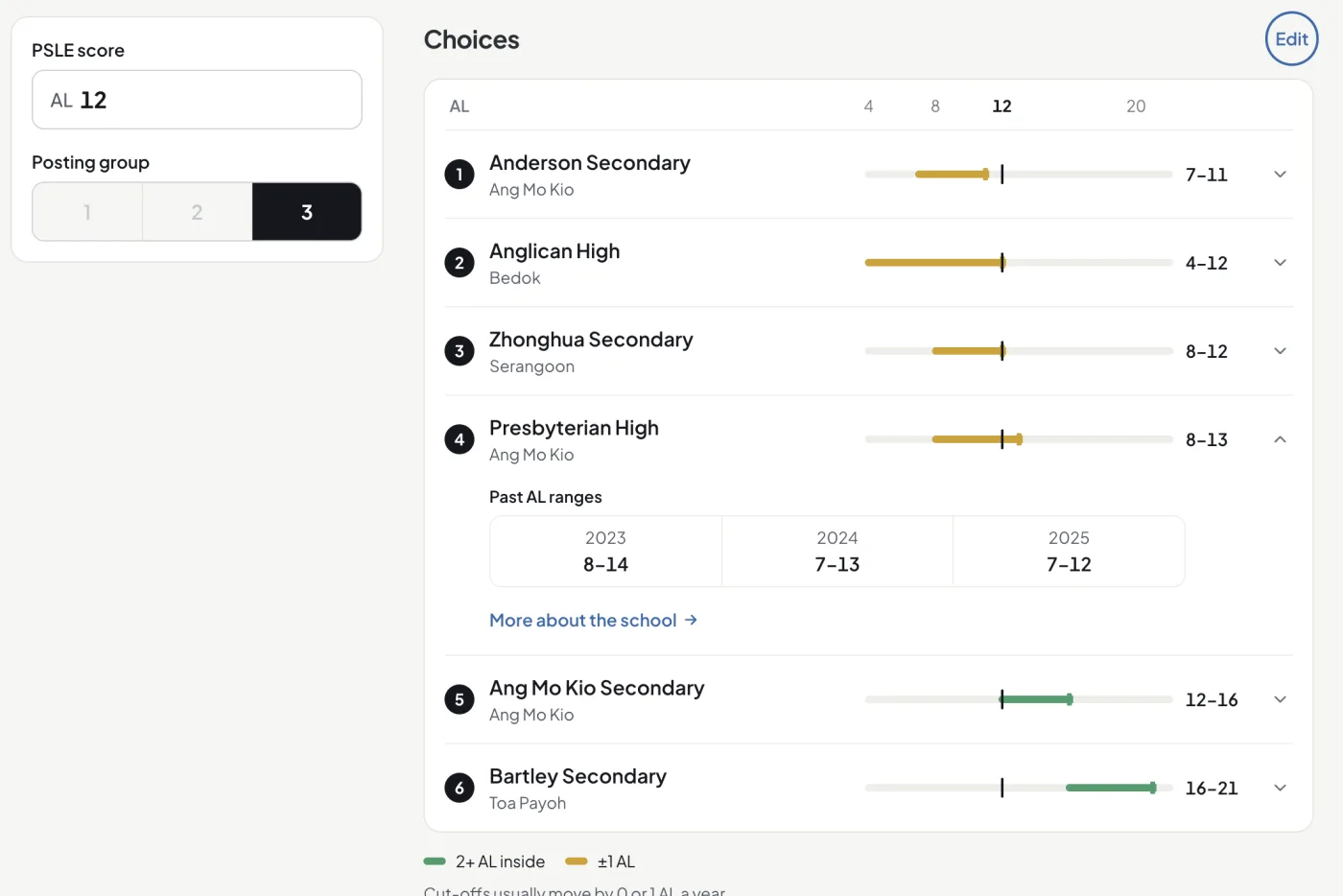
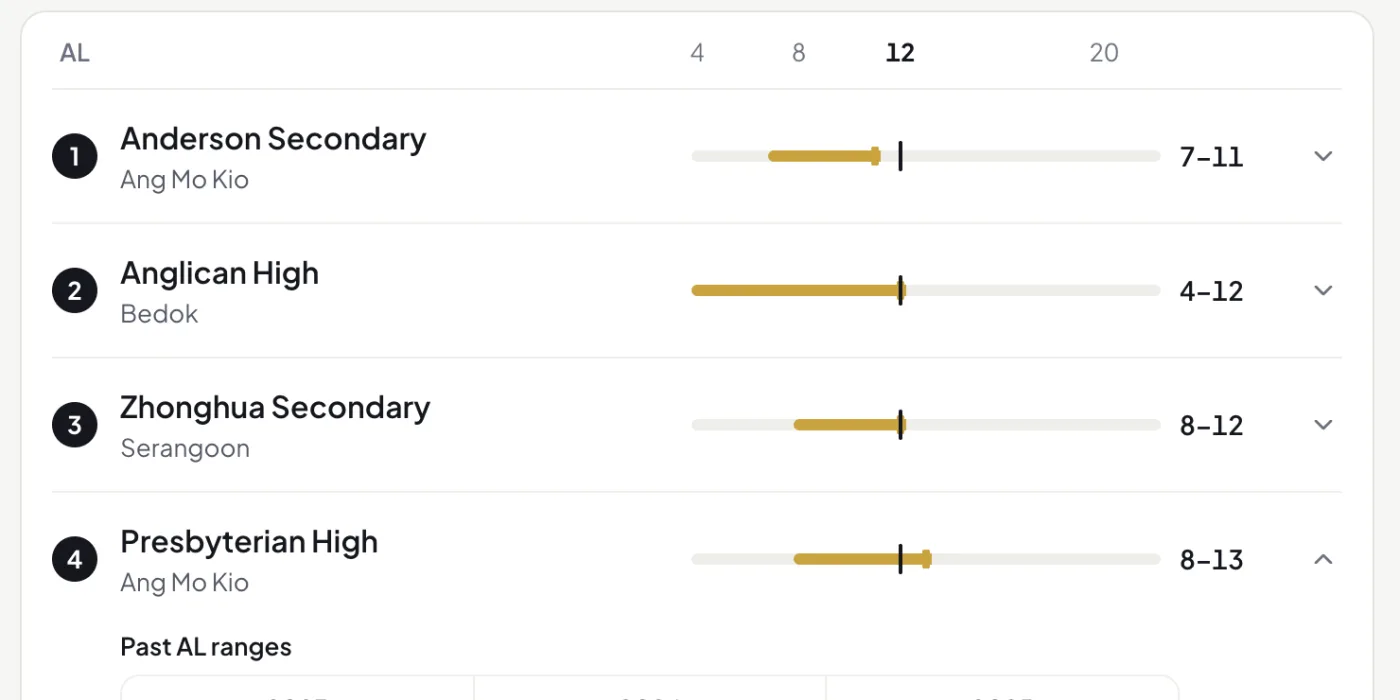
All 6 schools on one AL scale. The black line is AL 12, and each bar is that school’s 2025 PG3 range.
Every school sits on the same scale with your score drawn as a line, so you see the whole list in one glance. Green means your score is 2 or more points inside the cut-off; gold means it’s within 1 point either way. Anderson’s bar sits to the left of the line, which is exactly the warning you want.
Tap a row to see the school’s ranges for the past 3 intakes. Presbyterian High went 8–14, 7–13 and 7–12 before this year’s 8–13, a useful reminder that cut-offs drift.
Your list stays on your device, so you can close the tab and come back. What it doesn’t do yet: give you a link to send your spouse. That’s on our list (we know, we know).
2. alscore.sg
alscore.sg is the most hand-holding tool here, and it’s good at it.
You pick each of the 4 subject grades and it adds up the total. Schools are then sorted into Stretch, Realistic, Comfortable and Very safe, depending on how much room your score has under each cut-off.
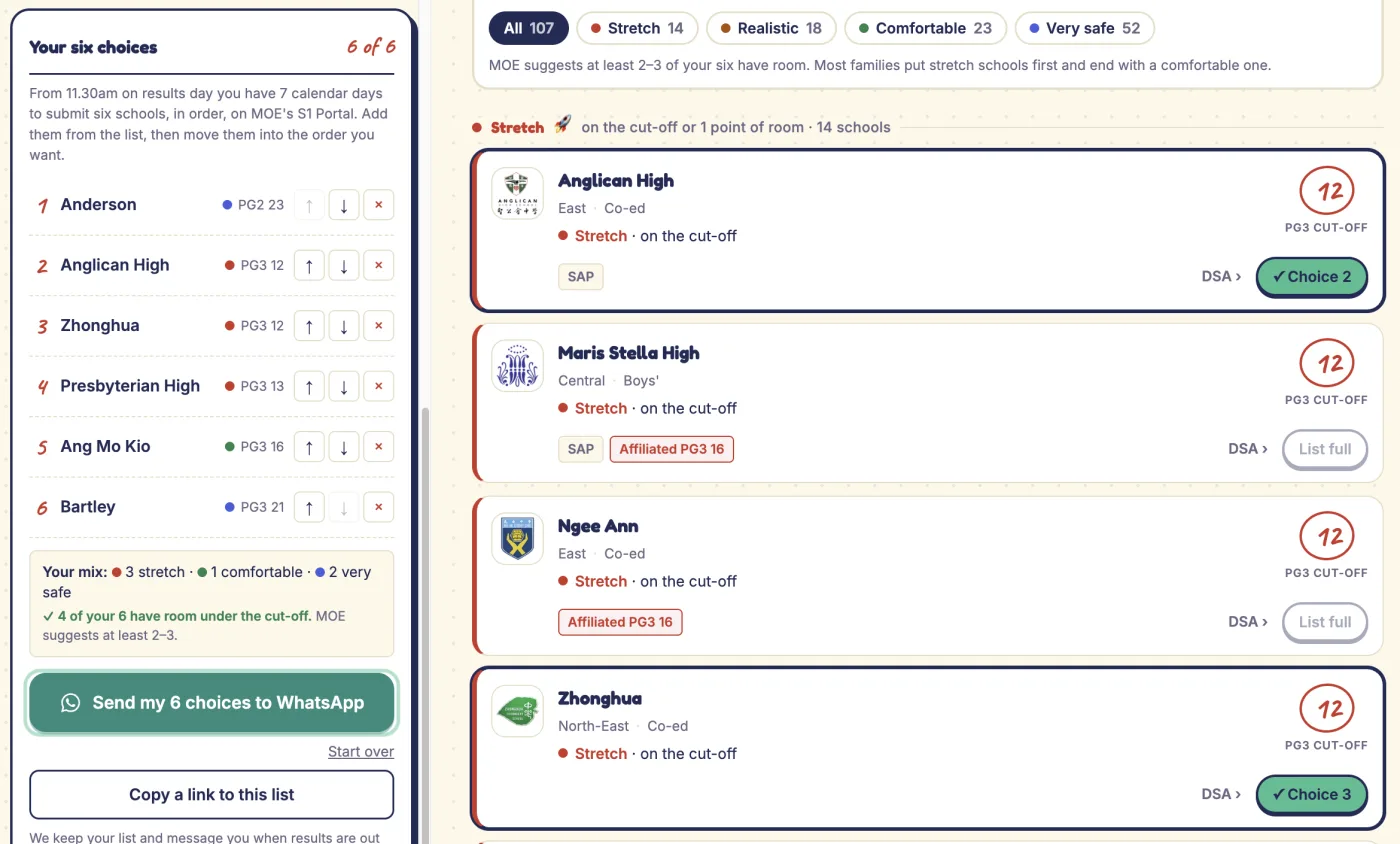
alscore.sg’s six-choice panel with ↑ ↓ ordering and a “Your mix” check.
The “Your mix” box is the best idea on this list. It counts your stretch and safe schools and checks the list against MOE’s advice to include at least 2 or 3 schools with room.
One quirk: Anderson didn’t appear in the PG3 results at AL 12, so we found it through search. It was then added under its Posting Group 2 cut-off of 23 and counted as “very safe”, even though the card itself says AL 12 posts through PG3. Double-check any school you add by search.
Your list survives a reload, and there’s a button to copy a link to it. The WhatsApp button signs you up for reminders, so skip it if you don’t want messages.
3. School Matters SG
School Matters is the broadest of the bunch: a full cut-off table with a bookmark on every row, plus CCAs, DSA and competition results.
Our 6 schools saved fine (it holds up to 12 on your device). The compare page, though, takes only the first 3.
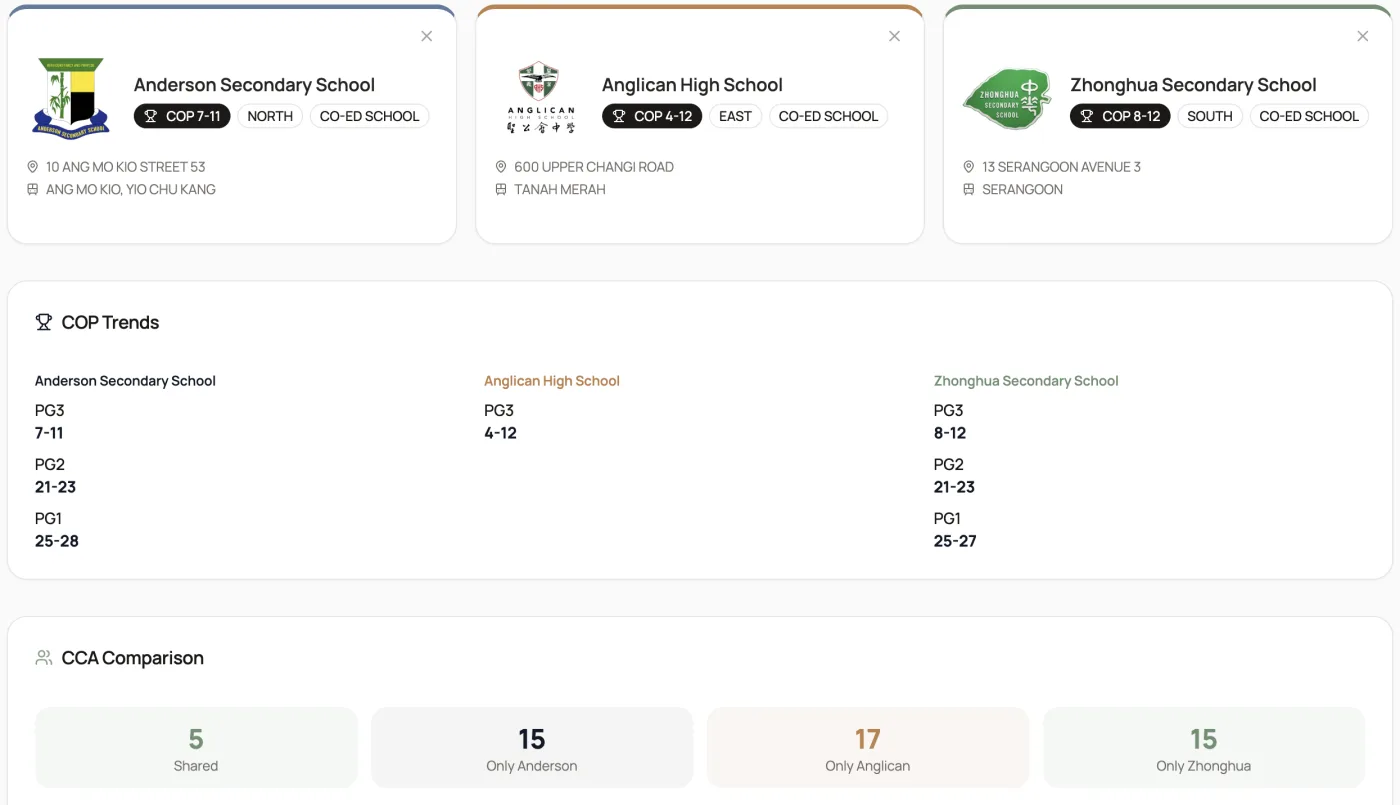
School Matters compares 3 schools side by side, including how many CCAs they share.
The side-by-side view helps with the “what else is different” question. The CCA comparison counts what’s shared and what’s unique to each school.
But there’s no score input, so it won’t tell you where AL 12 stands. Despite the “COP Trends” label, we saw only one range per posting group. On a phone, the 3 columns stack into one long scroll.
There’s a share button, and the compare link carries your schools.
4. MOE SchoolFinder
SchoolFinder is the official source, and every number elsewhere traces back to it. Use it to check the final list, whatever else you use.
Tap the heart on any school to add it to “My shortlisted”.
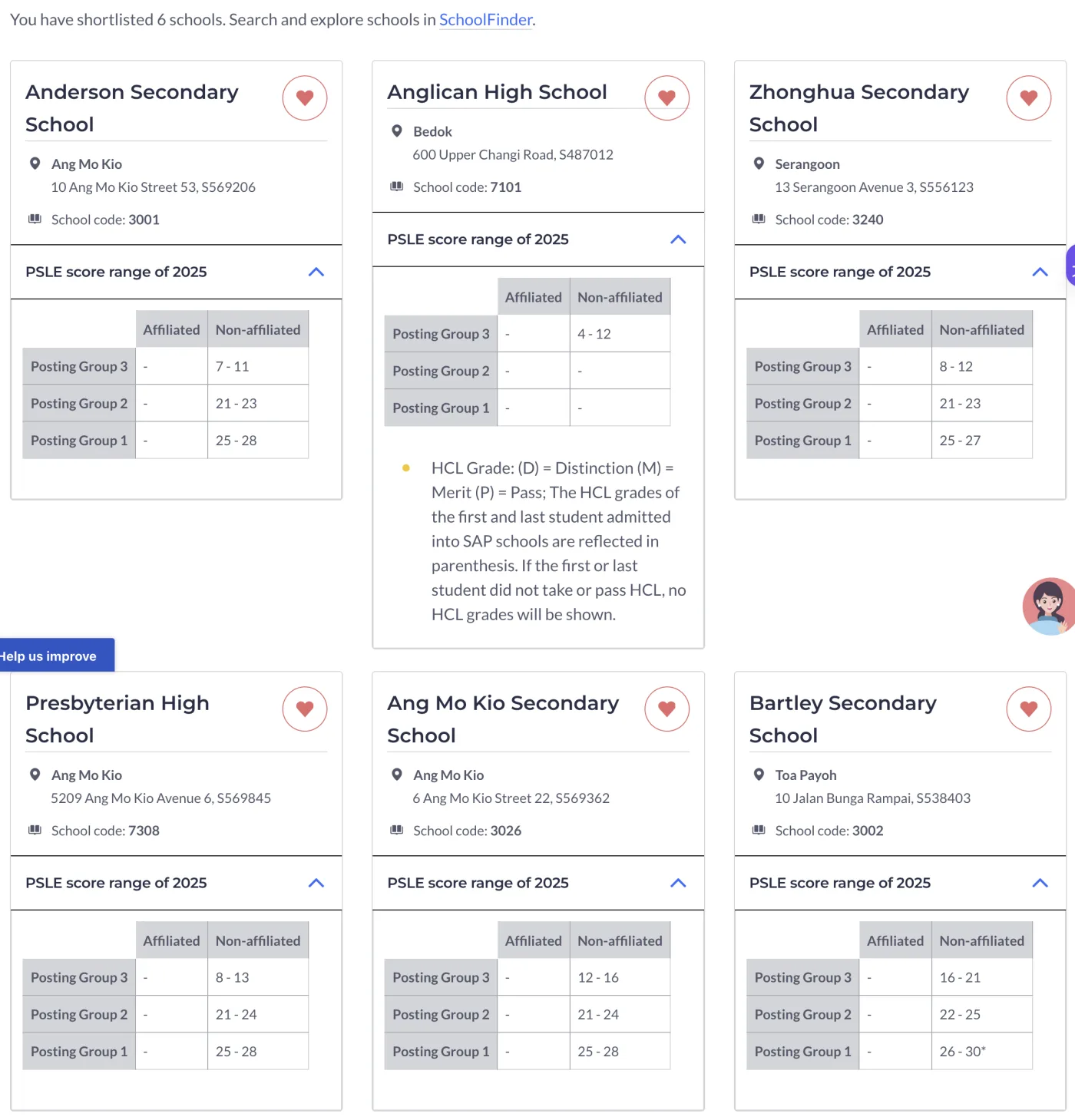
Six cards, each with its own posting group table. You open them one at a time.
Each card holds a small table of 2025 ranges by posting group, split into affiliated and non-affiliated. That’s the most complete data of any site. It’s also the hardest to compare, because there’s no score and no shared scale. You read 6 little tables and do the maths in your head.
The PSLE score filter on the listing page is a From/To range, and it’s loose. Filtering for 8 to 12 still returned 136 of 147 secondary schools when we tried it.
Your shortlist is saved in the browser. MOE warns it disappears if you clear your browsing data, and there’s no share or print button.
5. SLC AL Finder
SLC’s AL Finder comes from a tuition centre, and it has the most detailed table on this list.
Each row is a school, a posting group and an admission route. You see 3 years of cut-offs side by side, plus a column for how much the cut-off moved.
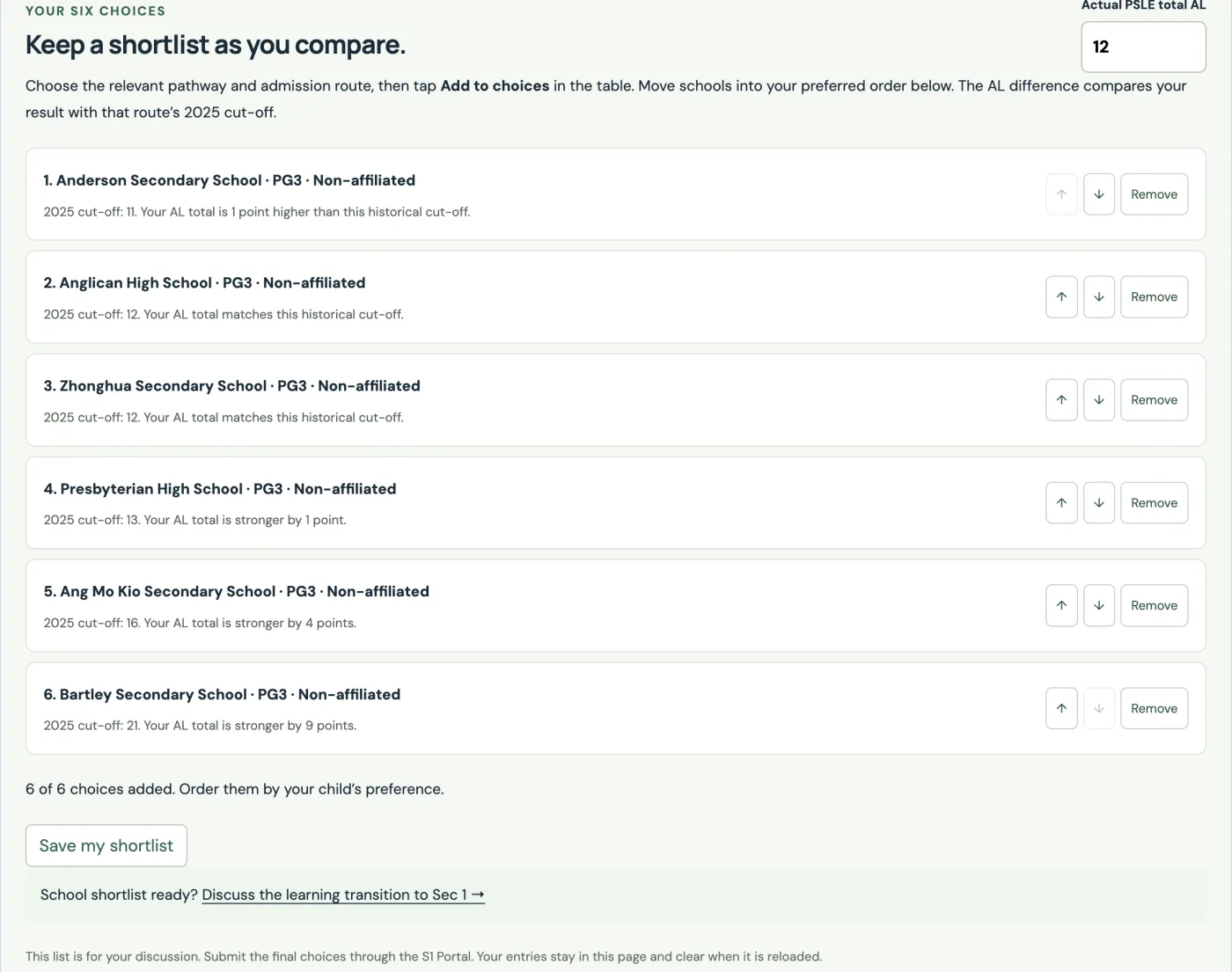
SLC spells out how AL 12 compares with each school’s 2025 cut-off, in plain words.
Tap “Add to choices +” on any row to build your 6. With your score entered, each choice gets a plain sentence, like “Your AL total is 1 point higher than this historical cut-off” for Anderson. It’s clear, if a bit wordy.
Your list clears when you reload the page, though. On a phone, the table also squeezes into a small scrolling box.
6. SchLah
SchLah doesn’t have a shortlist, but it earns a spot for its score check.
Pick a score and it lists every school that admitted that score or weaker through PG3, closest to your score first.
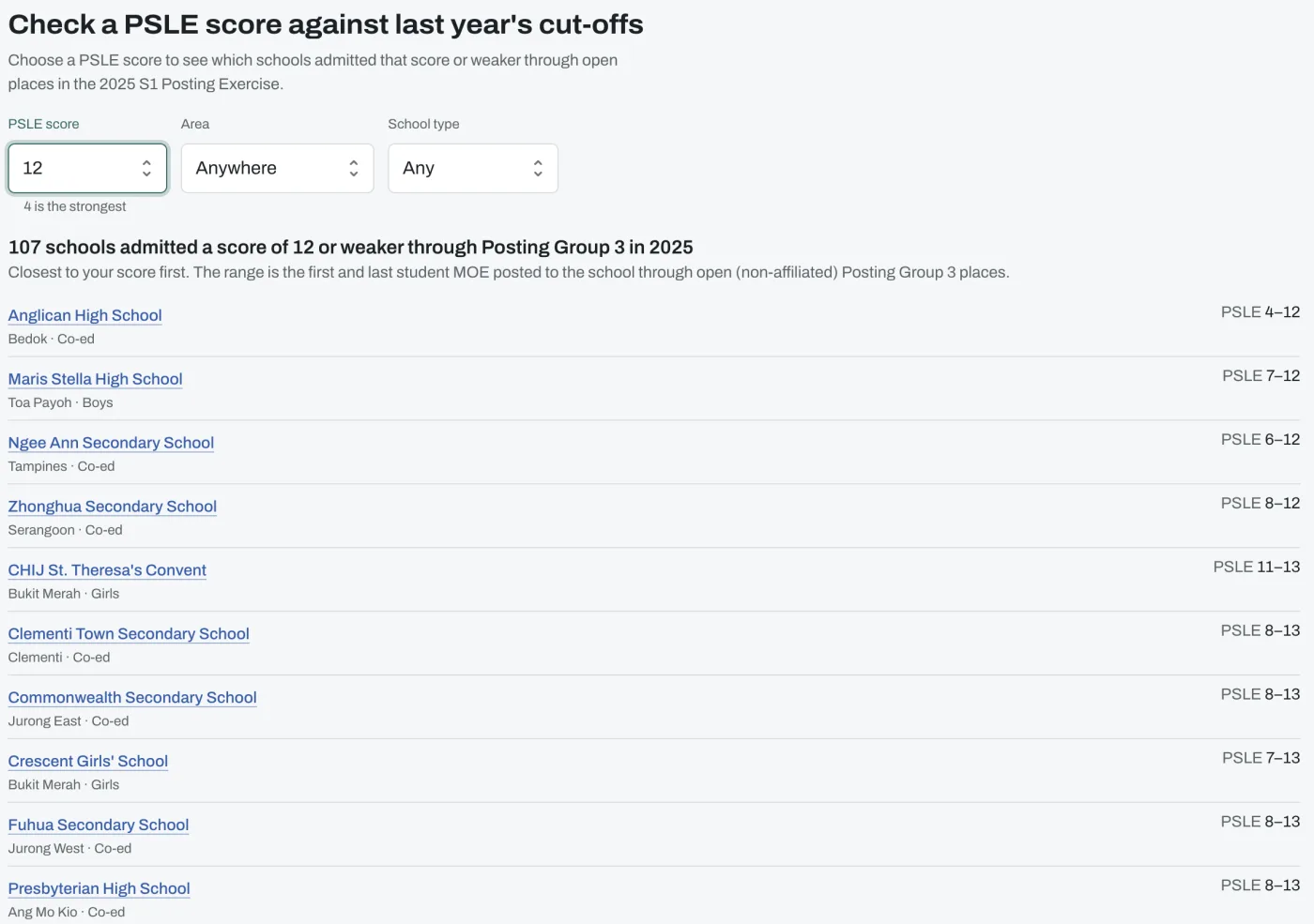
SchLah at AL 12: 107 schools, with the tightest fits at the top.
Below that, a “Just out of last year’s range” group lists schools where the last student admitted scored 1 or 2 points better. That’s where Anderson shows up. It’s a smart way to spot near misses you might still want as a stretch choice.
For anything else, there’s a spreadsheet-style table you can filter and export. Handy if you like spreadsheets. Most parents won’t.
7. SchoolAdvisor SG
SchoolAdvisor SG compares up to 4 schools across lots of dimensions: cut-offs, sports results, CCA achievements and a short culture summary.
So only the first 4 of our 6 made it in.
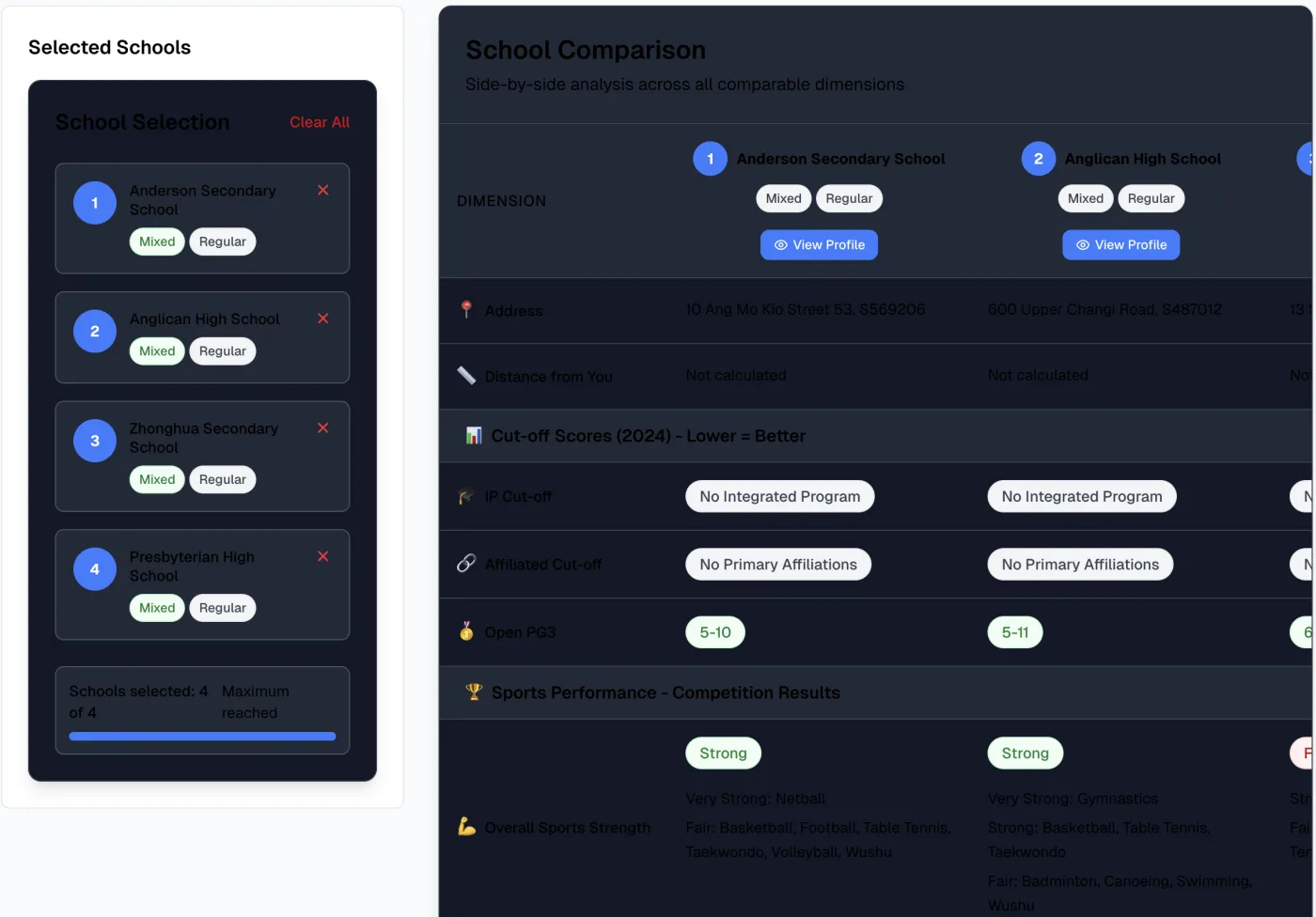
SchoolAdvisor’s table: one row per dimension, one column per school.
The breadth is nice if sports or CCAs matter to your child. But the cut-offs are labelled 2024, not 2025. Anderson shows 5–10 here, against 7–11 in MOE’s latest figures. Even on a wide screen, the table scrolls sideways after 2 schools.
Its school finder also asks for a postal code before showing any results.
Which should you use?
One is enough. We’d say ours, naturally, with MOE SchoolFinder to double-check the final figures.
The tool is the easy part. The hard part is the conversation with your child: which schools felt right, and why. Hopefully you made it to a few open houses.
When you’re ready to decide, these help: